
The GXBet login provides access to the personal account area, casino, live casino, sports betting, promotions, missions and loyalty programme. In the interface we reviewed, the LOG IN button appears in the top-right corner. The sign-in window asks for the registered email address and password.
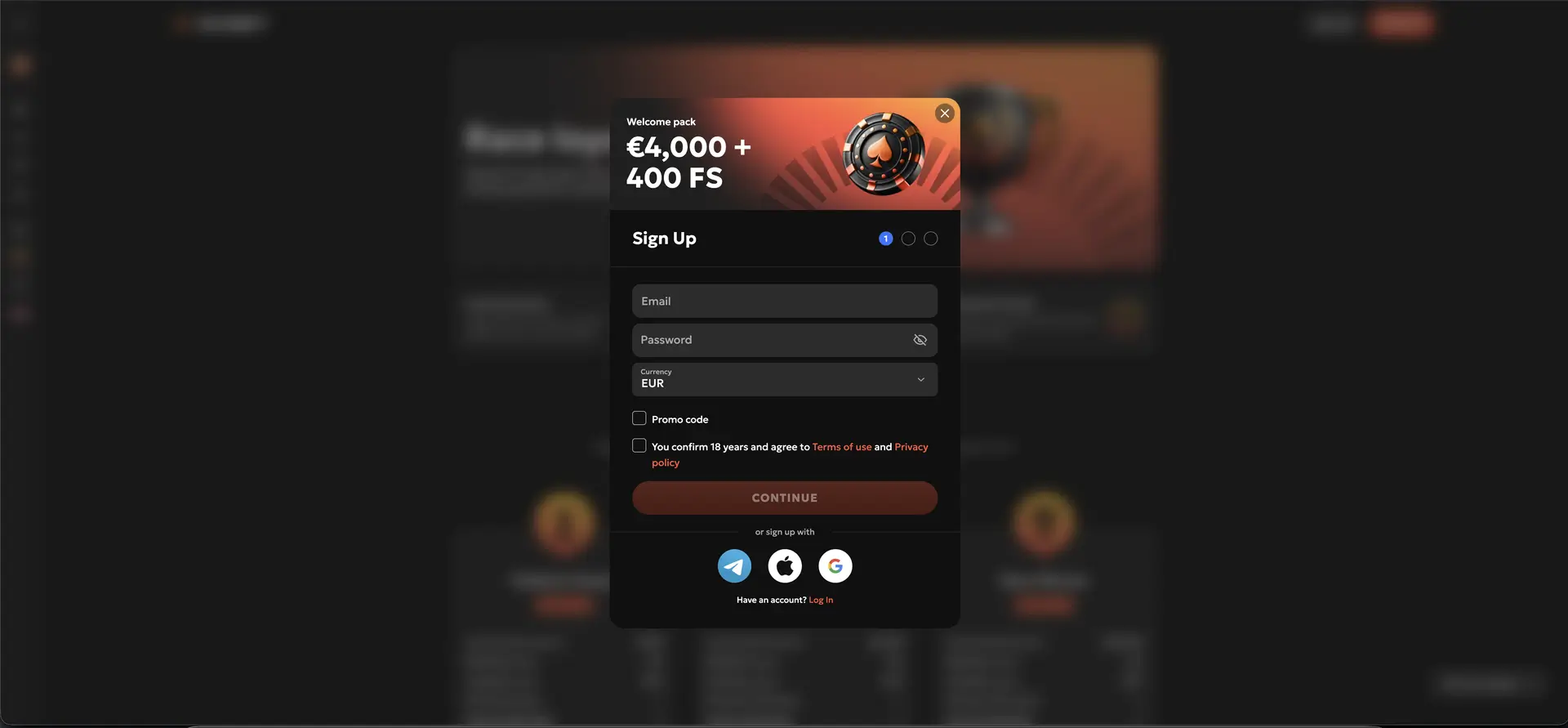
We also reviewed the registration process. The form supports EUR and asks users to select their country and the correct telephone country code. The sections below explain how the GXBet login works, which alternative methods are displayed and what to do when a session does not open.
| Login Item | Details |
|---|---|
| Where to log in | LOG IN button in the top-right corner of the GXBet page |
| Standard method | Email address and password |
| Alternative access | Telegram, Apple and Google |
| Show password | Eye icon in the password field |
| Password recovery | “Forgot password?” link below the password field |
| Create an account | Three-step registration process |
| Account currency | EUR where available |
| Mobile access | Mobile browser and home-screen shortcut |
| Support | 24/7 through [email protected]; general enquiries through [email protected] |
How Does the GXBet Login Work?
The sign-in window is compact and contains only the details required for a standard session. Use the same email address that was entered during registration and remember that passwords are case-sensitive.
Step-by-Step GXBet Login
- Open the GXBet website in an up-to-date browser.
- Click LOG IN in the top-right corner.
- Enter the email address linked to the account.
- Enter the password. Use the eye icon to check the entry temporarily.
- Click LOG IN and wait for the personal account area to load.
- After signing in, check that the correct EUR balance and account details are displayed.
Alternative GXBet Login Through Telegram, Apple or Google
Three icons for Telegram, Apple and Google appear below the standard login form. These methods may be faster when the account has already been linked to the same external service. Always choose the method used during registration or a previous linking process; otherwise, a new or empty profile may open.
- Telegram: use the correct Telegram account and review the confirmation message.
- Apple: check whether “Hide My Email” was used during the original registration.
- Google: select the Google account linked to GXBet.
Creating a GXBet Account
Users without a profile can click Sign up from the login window. Registration consists of three screens and displays a welcome package worth up to €4,000 plus 400 free spins.
Registration in Three Steps
- Account details: enter an email address and password, select EUR when available, open the Promo code field if required, and confirm that you meet the legal age requirement and accept the terms and privacy policy.
- Personal details: enter your first name, last name, country, city and address. Select the country where you legally reside.
- Additional details: select the requested title or gender, enter your date of birth and add a telephone number with the correct international country code.
Use accurate personal information. Differences between registration details and later verification documents may trigger additional checks or delay account functions.
Recovering a GXBet Password
The Forgot password? link appears directly below the password field. Subsequent verification steps may depend on the account settings, but the recovery process begins through this link.
Steps for a Forgotten Password
- Open the GXBet login window.
- Click Forgot password?.
- Enter the account email address when requested.
- Check both the inbox and the spam or junk folder.
- Follow only the link contained in the official recovery message.
- Create a new, unique password and try to log in again.
Logging In to GXBet Safely
- Open GXBet from a saved bookmark and check the domain before entering account details.
- Use a unique password that is not shared with other services.
- Do not save the password on a shared device.
- Log out after use, especially on a public or borrowed computer.
- Never share recovery codes or account details through chat or social media.
- Review Telegram, Apple or Google notifications before confirming external access.
GXBet Login on Mobile
The mobile GXBet page is accessible on iOS and Android. The installation page shows how iOS users can create a home-screen shortcut through Safari. This allows the website to open from the home screen without entering the address each time.
Tips for Mobile Login
- Use an up-to-date version of Safari, Chrome or another modern browser.
- Check that cookies and JavaScript are allowed for the site.
- Close older GXBet tabs if the login window continues to load.
- Prefer your own mobile connection or a trusted Wi-Fi network.
- Delete and recreate an old home-screen shortcut if it opens an incorrect page.
Common GXBet Login Problems
Incorrect Email Address or Password
Check for extra spaces, capital letters and the active keyboard layout. When an external method was used during registration, try the same Telegram, Apple or Google option.
The Login Window Does Not Respond
Refresh the page, clear temporary browser data and disable extensions that block scripts, cookies or pop-ups. Then try a private window or another browser.
An External Login Opens the Wrong Profile
Sign out of the external service and deliberately select the correct account. This is especially relevant on devices with several active Google or Apple accounts.
Account Temporarily Restricted
Repeatedly entering incorrect details may trigger a security review. Stop making consecutive attempts and contact customer support.
What Is Available After the GXBet Login?
The navigation visible in the reviewed interface includes the following sections:
- Missions: account-specific tasks and promotions.
- Casino and Live Casino: game categories and live tables.
- Sports: sports markets and events.
- Collections: curated game collections.
- Promotions and My Bonuses: available offers and activated bonuses.
- Promo Code: area for entering a valid promotion code.
- Race Loyalty: the loyalty programme area.
- Support: access to help and contact options.
Account Verification and KYC
The registration screens ask for a name, address, date of birth and telephone number. Additional verification may be requested later in the account process or before a withdrawal. GXBet may ask for an identity document, proof of address or confirmation of a payment method. Follow only the document list shown in your account or provided by official support.
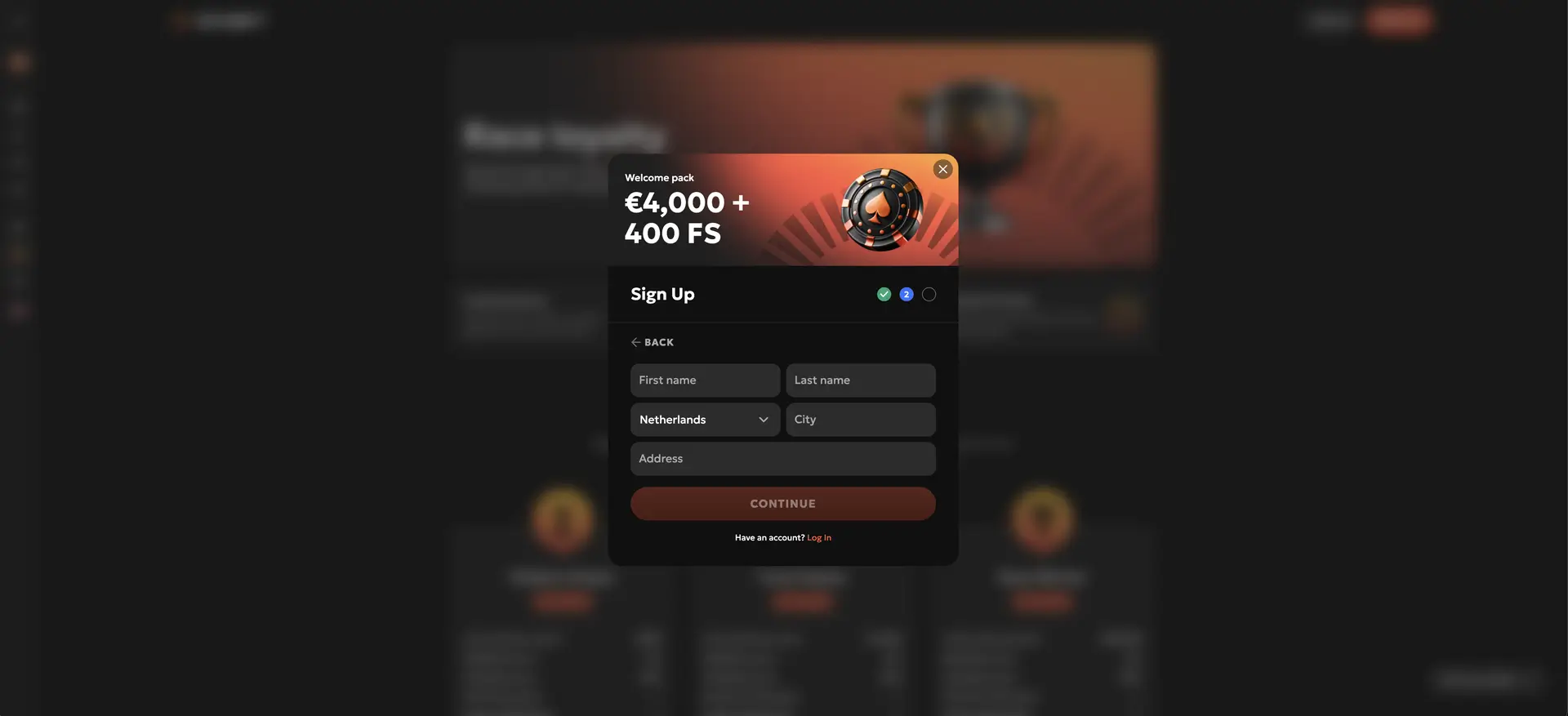
Make sure the name and address match the information entered during registration. Do not send documents to addresses that are not displayed on the official contact page or in the secure account area.
Frequently Asked Questions About the GXBet Login
Which details do I need to log in to GXBet?
The standard GXBet login requires the registered email address and password. Telegram, Apple and Google are also displayed as alternative methods.
Where is the GXBet login button?
The LOG IN button appears in the top-right corner of the interface.
Can I recover my GXBet password?
Yes. Use the “Forgot password?” link below the password field and follow the recovery process displayed by GXBet.
Can I open GXBet on my phone?
Yes. The site opens in a mobile browser, and the installation page also shows an option for launching GXBet from a home-screen shortcut.
Which currency is shown during European registration?
EUR is displayed as a currency option during registration. Availability may depend on the user's country.
What should I do when the GXBet login is blocked?
Stop repeated attempts, recover the password if necessary and contact [email protected].
Is support available 24/7?
The contact page states that customer support is available 24/7 through [email protected]. The address [email protected] is listed for general enquiries.